Veeam Backup & Replication
Enterprise backup and replication across virtual, physical and cloud workloads.
- Platforms
- Windows console; protects VMware/Hyper-V/Nutanix/Proxmox, physical servers, cloud, M365
- Licence
- Freemium — free Community edition (up to 10 instances)
- Price
- Free Community edition; paid Data Platform
- Category
- Backup & disaster recovery
- Updated
- 2026-11-05
What it is
Veeam Backup & Replication is an enterprise platform for backing up and replicating virtual, physical and cloud workloads. It offers centralised backup, instant recovery, replication for DR and immutable copies against ransomware, and is an industry standard. A free Community edition covers up to 10 instances.
Problems it removes
- Virtual machines must be backed up without taking them offline or hammering production storage.
- After a failure you need a whole VM, or a single file inside it, back in minutes rather than hours.
- Backups themselves could be reached by ransomware, so copies must be immutable and offline.
How administrators use it
- Add vCenter/Hyper-V hosts and back up at the hypervisor level with changed-block tracking.
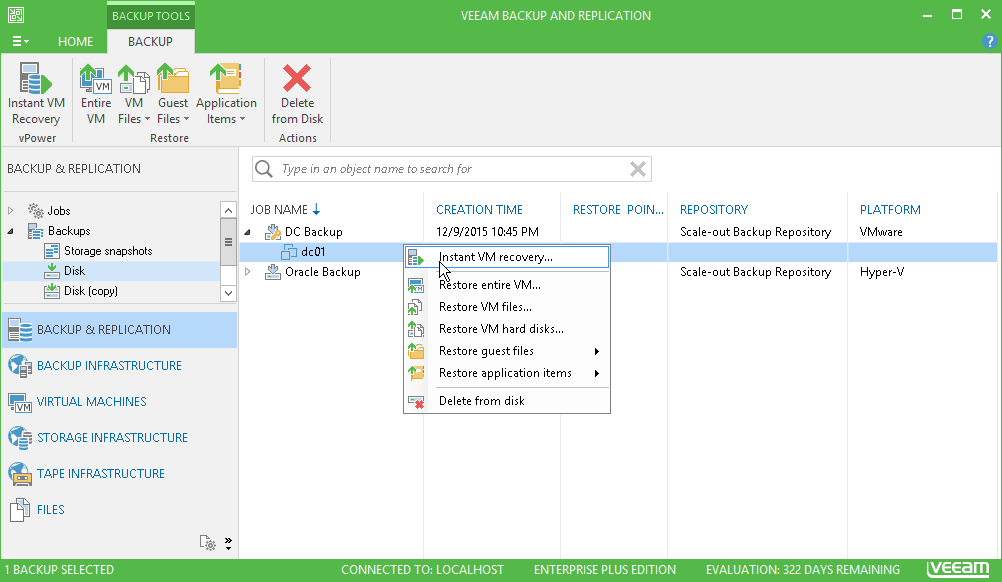
- Use Instant Recovery to boot a VM straight from the backup while it restores in the background.
- Send a copy to immutable object storage or tape to satisfy the 3-2-1 rule.
Strengths & trade-offs
Strengths
- Industry standard with broad platform coverage.
- Fast, granular recovery — whole VM or a single item.
- Free Community edition up to 10 instances.
Trade-offs
- The full feature set is a paid, per-workload licence.
- The management console runs on Windows.
- At scale it becomes real infrastructure to plan and size.
Common questions
Is the Community edition actually free?
Yes — it covers up to 10 instances with no time limit. Paid editions add capacity and advanced features.
Does it protect physical servers too?
Yes, through agents, in addition to virtual machines, cloud workloads and Microsoft 365.
Alternatives
Backup plus cyber protection — anti-malware, EDR and patching — in one console.
desktop download NAKIVO Backup & ReplicationAffordable backup, replication and DR that can run straight on a NAS.
desktop download BareosOpen-source, client-server enterprise backup to disk, tape or cloud.
desktop download